

Introduction
Machine learning (ML) is a rapidly evolving technology that can bring significant value to various domains and applications. However, developing and deploying ML solutions is not a simple task. It requires a systematic and disciplined approach to manage the entire lifecycle of ML projects, from data collection and preparation to model development and evaluation to deployment and monitoring in production. This approach is known as MLOps, which stands for machine learning operations.
MLOps is a set of practices and principles that aim to align and streamline the workflows and collaboration among data scientists, ML engineers, developers, and IT operations. MLOps is inspired by the DevOps methodology, which advocates for automation, integration, and continuous delivery of software products. Similarly, MLOps enables faster and more reliable delivery of ML models while ensuring quality, reproducibility, and governance.
MLOps can address some of the common challenges and pain points of ML projects, such as:
Data and Model Drift: ML models can become less effective over time because of shifts in data or environment. MLOps can help monitor and address data and model drift by allowing continuous data verification, model updating, and testing.
Model Management: ML projects can have different versions of data, code, and models, which can be hard to track and evaluate. MLOps can help sort and control the artifacts and metadata of ML projects and provide visibility and origin of ML models from source to production.
Scalability and Efficiency: ML projects can need a lot of compute and storage resources, which can be expensive and slow to set up and manage. MLOps can help improve and automate the use and distribution of resources and use cloud-based services and platforms to adjust to the demand.
Collaboration and Communication: There are often many different people involved; when working on ML projects, they have different roles, skills, and expectations, which can cause confusion and conflict. MLOps can help improve collaboration and communication among people and define clear roles, responsibilities, and feedback loops.
Azure Machine Learning service is a cloud-based platform that provides a comprehensive and integrated solution for MLOps. Azure Machine Learning service enables you to:
- Create and configure an Azure Machine Learning workspace, a centralized place to manage your ML projects, resources, and artifacts.
- With Azure Machine Learning SDK and CLI, you can work with the workspace and do different MLOps tasks, such as setting up and running experiments, recording and logging metrics and outputs, signing up and versioning models, packaging and deploying models, and watching and solving problems with models.
- Leverage Azure Machine Learning Studio is a web-based interface that allows you to access and visualize your workspace and perform drag-and-drop ML tasks using a graphical user interface.
- Use Azure services and tools, such as Azure Data Factory, Azure Databricks, Azure Synapse Analytics, Azure DevOps, and Visual Studio Code, to improve and expand your MLOps features and processes.
This blog post will show how Azure Machine Learning service can assist you with your MLOps workflows and enhance them and how to begin using Azure Machine Learning service in your own ML projects.
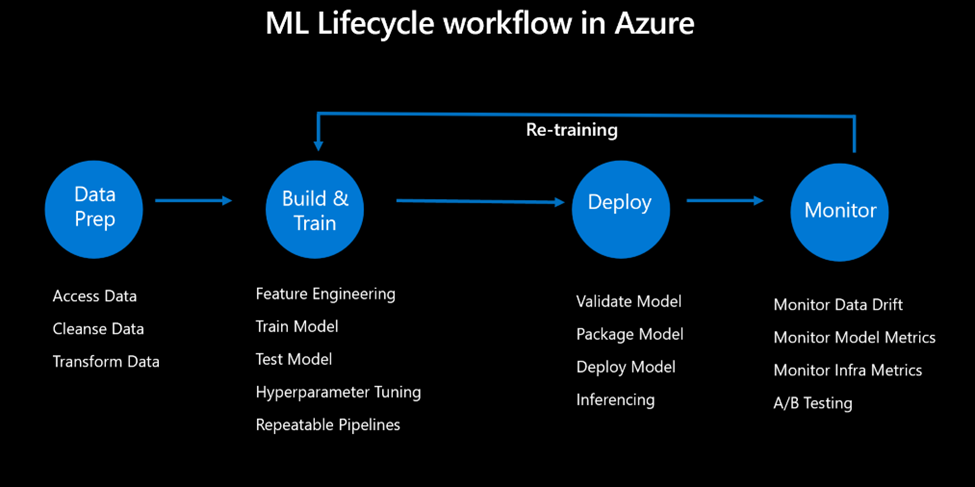
MLOps
Azure Machine Learning service is a cloud-based platform that enables you to create, train, deploy, and monitor machine learning models at scale. It works with code-first and no-code/low-code methods and connects with common frameworks and tools such as PyTorch, TensorFlow, Scikit-learn, and ONNX. Azure Machine Learning service also provides various components and features that help you apply MLOps best practices, such as:
- Azure Machine Learning Designer: a drag-and-drop interface that lets you create and deploy ML pipelines without writing code.
- Azure Machine Learning Studio: a web-based portal with a centralized place to manage your ML projects, resources, and artifacts.
- Azure Machine Learning compute: a scalable and managed compute infrastructure that you can use to run your training and inference workloads on CPUs, GPUs, or FPGAs.
- Azure Machine Learning datastores and datasets: abstractions that help you access and manage your data sources and objects consistently and securely.
- Azure Machine Learning Pipelines: a framework that allows you to orchestrate and automate your ML workflows using Python scripts or the designer.
- Azure Machine Learning Experimentation: a service that helps you track, compare, and reproduce your experiments and runs and visualize your metrics and outputs.
- Azure Machine Learning Models: a registry that stores and versions your trained models and their metadata and enables you to deploy them to various endpoints, such as Azure Kubernetes Service, Azure Container Instances, Azure Functions, or Azure IoT Edge.
- Azure Machine Learning Endpoints: a service that manages the lifecycle and performance of your deployed models and provides capabilities such as load balancing, traffic splitting, logging, and monitoring.
- Azure Machine Learning MLOps: tools and practices that help you apply DevOps principles to your ML lifecycle, such as automated testing, continuous integration, continuous delivery, and governance.
Deployment
To deploy and monitor ML models using Azure Machine Learning service, you need to follow these steps:
To register your trained model in the Azure Machine Learning workspace, you can use the azureml.core.Model class in the SDK or the az ml model command in the CLI. This step also allows you to add metadata such as name, description, tags, and framework for your model.
After that, you must create an endpoint configuration defining how your model will be hosted and used. You can use the azureml.core.Endpoint class in the SDK or the az ml endpoint command in the CLI. You can set the compute target, the inference configuration, the deployment configuration, and the traffic allocation for your endpoint.
The last step is to deploy your model to the endpoint and track how it performs and works. You can use the deploy() method of the Endpoint class in the SDK or the az ml endpoint create command in the CLI. You can also use the get_logs(), get_metrics(), and get_state( )methods of the Endpoint class or the az ml endpoint show command to see the status, logs, and metrics of your endpoint.
Best Practices
- Use Azure Machine Learning Designer to create and orchestrate your machine learning pipelines using a drag-and-drop interface, or use the SDK to define and run your pipelines as Python scripts programmatically.
- Use Azure Machine Learning datasets to manage and version your data sources and track their use in your experiments and models.
- Use Azure Machine Learning experiments to log and track your model training runs, metrics, outputs, and code.
- Use Azure Machine Learning models to register, version, and package your trained models for deployment.
- Use Azure Machine Learning endpoints to deploy your models as web services and scale them dynamically based on demand.
- Use Azure Machine Learning interpretability and fairness tools to explain your model predictions and identify potential biases.
- Use Azure Machine Learning AutoML to automatically find the best model for your data and task and optimize its hyperparameters.
Conclusion
MLOps uses DevOps practices and methods in machine learning projects, such as continuous integration, continuous delivery, testing, monitoring, and governance. MLOps with Azure Machine Learning service can help you speed up and grow your machine learning projects by providing a cloud-based platform that covers the whole machine learning lifecycle, from data preparation and experimentation to deployment and management. With Azure Machine Learning service, you can:
- Use automated machine learning to quickly find the best model for your data and scenario.
- Track and manage your experiments, models, artifacts, and data using Azure Machine Learning Studio or Python SDK.
- Deploy your models to various endpoints, such as Azure Kubernetes Service, Azure Container Instances, Azure IoT Edge, or Azure Functions.
- Monitor your model performance and data drift using built-in dashboards and alerts.
- Implement CI/CD pipelines for your machine learning workflows using GitHub Actions, Azure DevOps, or Azure Machine Learning CLI.
- Secure and govern your machine learning assets using role-based access control, encryption, auditing, and compliance features.
Resources
https://learn.microsoft.com/en-us/azure/architecture/ai-ml/guide/mlops-maturity-model
 Dave's Two Cents